
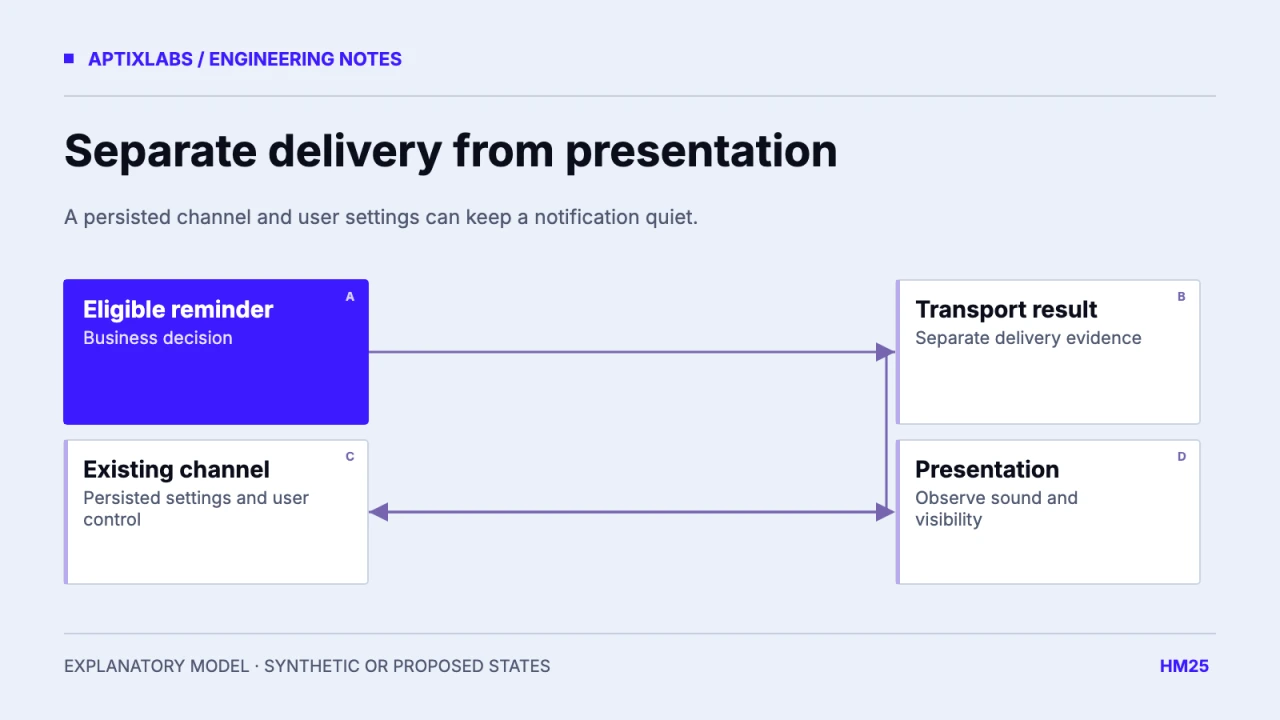
A delivered Android notification can remain silent because its existing channel controls presentation. Changing a payload’s sound field does not necessarily change a channel that already exists on the device. Inspect the channel identity, initial configuration and current user settings before treating silence as a delivery failure.
Collect the installed app build, Expo Notifications version, Android version, channel ID and installation history. A fresh installation and an upgraded installation can have different persisted channel state even when the JavaScript source is identical. Keep transport evidence separate from audible behavior.
Trace delivery and presentation independently
An accepted push or a downstream receipt is transport evidence. It does not prove a sound was played or a person noticed the message. For a synthetic reminder, record the business event, transport result and the channel selected on the device as separate fields.
| Evidence | Possible interpretation | Next check |
|---|---|---|
| Delivery accepted | Transport accepted work | Retrieve applicable receipt |
| Notification visible but silent | Presentation differs | Inspect actual channel settings |
| Payload references old channel | Existing settings still apply | Check channel identity |
| Fresh install sounds, upgrade silent | Persisted state differs | Compare current device channels |
The worksheet is illustrative and was not executed on Android. Do not send repeated customer reminders to diagnose sound. Use a controlled synthetic event on a test device and keep message content free of personal health detail.
Inspect the existing channel before recreating it
Android’s channel documentation states that users control channel behavior after creation and that recreating an existing channel with its original settings is a no-op. Read the channel’s current settings and provide an appropriate settings route rather than repeatedly trying to overwrite the user’s choice.
Android: notification channel persistence and user settings
Expo exposes channel configuration and inspection APIs and documents channel-aware sound configuration. Verify those methods against the installed Expo version and native build. A custom sound asset may also require native configuration; a JavaScript filename is not evidence that the sound was bundled into the binary.
Expo: notification channels and sound configuration
Use stable channel purposes
The reviewed UltraFit360 channel map defines reminders, achievements, recovery and updates with differing importance and sound settings. That establishes source-level intended categories. It does not establish the persisted settings on an installed device or guarantee an interruptive alert.
A new channel ID creates a new preference surface. Use that deliberately when a genuinely new notification purpose requires it; do not rotate channel IDs simply to evade a user’s silent setting. Keep the visible channel names understandable and align them with the application’s notification preferences.
Test installation history and user changes
Build a device matrix covering fresh install, upgrade with an existing silent channel, user-disabled sound, app-level notification permission and foreground versus background presentation. Keep channel inspection output redacted and pair it with an observed visible or audible result. A transport-only unit test cannot establish this behavior.
Also test a missing custom sound and a payload referencing an unknown or unintended channel under the actual supported SDK. Confirm that the application offers a useful explanation and settings link when the reminder is eligible but quiet. Do not claim the app can force a sound through every device mode.
No exact fictional local device settings state was verified, so the researched screenshot is replaced by a delivery-to-channel diagram. Before release, capture real test-device evidence with fictional reminders and version details. That evidence should show why the notification was quiet, rather than presenting a generated settings screen as a native result.
Inspect foreground handlers separately from channel configuration. A notification received while the app is visible can follow application presentation decisions in addition to persisted native settings. Include foreground, background and terminated-state observations under the same fictional event. If only one state is quiet, keep that distinction in the diagnosis. Changing a server payload repeatedly may hide the true boundary when the visible difference is caused by application lifecycle or the selected presentation handler.
Push notifications cross platform
Bring the supported devices, installed SDK versions and a reproducible lifecycle or UI failure to scope a mobile engineering assessment.
Explore react native development
Why might an Expo Android notification stay silent after its payload changes?
On channel-based Android versions, presentation depends on the existing channel and user settings as well as the payload. Inspect the actual channel before changing transport code.
Should a new channel ID be created to bypass a silent preference?
No. Channel identity should reflect a deliberate purpose; respect user settings and offer an appropriate settings route.