
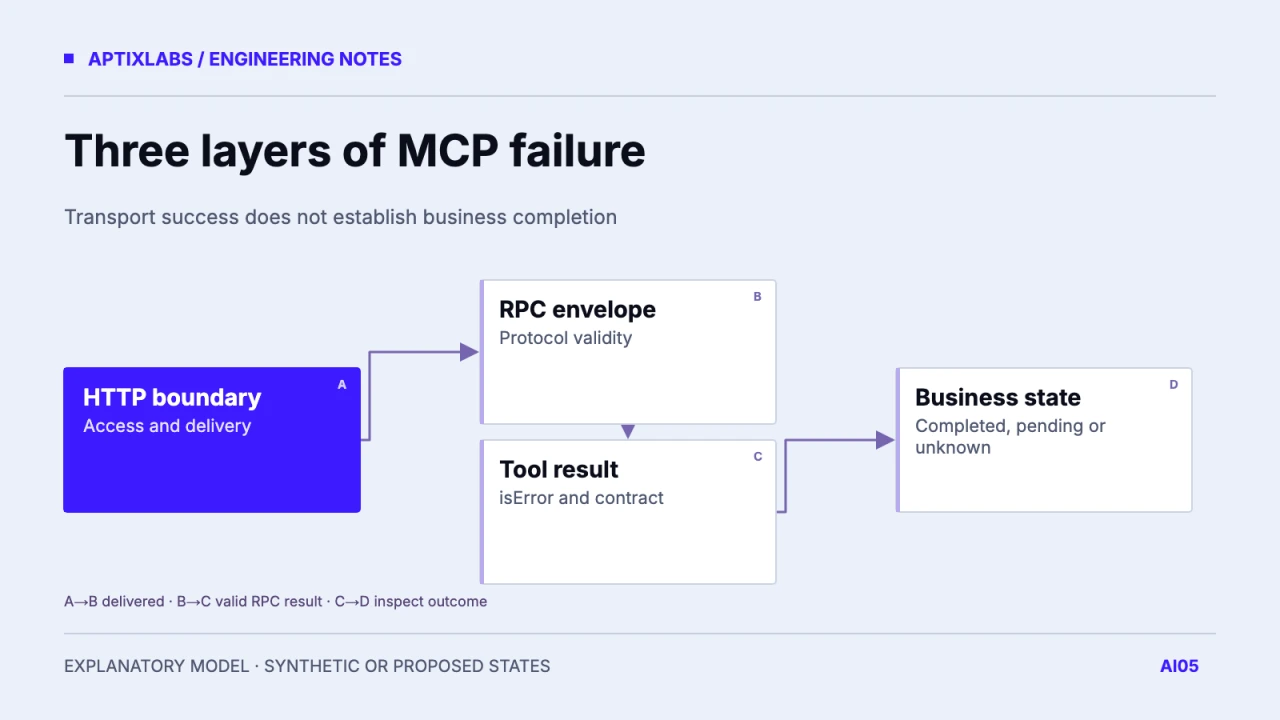
Classify an MCP failure at the layer where it occurs before deciding what the assistant should say or retry. HTTP authorization, JSON-RPC protocol errors and tool-level failures carry different meanings. An HTTP 200 response can contain a failed tool result, and a timeout can leave the business outcome unknown. Store the classification with the operation identity instead of treating every received response as task completion.
Read outside in
Start with the connection and HTTP response. A gateway refusal or authentication challenge can prevent the request from reaching MCP dispatch. Next inspect the JSON-RPC envelope for an error. Finally, inspect an otherwise valid tool result for isError and the tool's own outcome contract. Keep parse errors separate from a successful result containing an unexpected business value. Each layer needs a bounded message for the model and a more detailed diagnostic for operators.
The current TypeScript SDK error guidance distinguishes protocol failures from errors returned by tool handlers. Use the API appropriate to the SDK major version you installed. Low-level error construction copied from another version can bypass the SDK's intended mapping. HTTP status behavior also depends on the negotiated MCP revision and transport; avoid inventing one universal status rule for historical and modern clients.
MCP TypeScript SDK: protocol and tool errors
Three synthetic responses
Imagine an assistant preparing a report. In the first case, its access credential is expired and the HTTP boundary challenges it. In the second, it requests an unknown method and receives a protocol error. In the third, a known report tool runs but cannot find an eligible reporting period; the result explicitly marks a tool failure. None justifies telling the user that the report was created.
| Failure point | Evidence | Next decision |
|---|---|---|
| Authentication | HTTP challenge | Refresh or request access |
| Unknown method | JSON-RPC error | Correct operation or revision |
| Known tool cannot finish | isError result | Explain and repair permitted input |
| Reply lost after write | No confirmed response | Reconcile operation status |
{
  "jsonrpc": "2.0",
  "id": 42,
  "result": {
    "content": [{"type": "text", "text": "No eligible reporting period."}],
    "isError": true
  }
}
This illustrative result is deliberately model-readable. It explains the failed task without exposing a database query, credential or stack trace. A machine consumer can retain its own stable application error category where the supported schema permits it. Do not make the assistant infer failure by searching an arbitrary success string for the word error. Conversely, user-controlled document content that mentions an error must not alter the protocol classification.
Decide recovery after identifying the outcome
A permission refusal needs a corrected grant or a different permitted task. Repeating it unchanged wastes budget. A malformed argument may be repairable if the assistant has an authoritative constraint and retains the user's intent. An internal fault requires a bounded retry policy or support reference. For side-effecting tools, check durable status before repeating an operation whose response was lost. The error category alone cannot prove whether a write committed.
Define separate fields for transport outcome, tool outcome and business state in your trace. For example, a report request can have response_lost, outcome_unknown and export_job_pending at the same time. Collapsing them into failed encourages unsafe retries; collapsing them into successful hides work that still needs recovery. Keep an operation identifier that the status endpoint can resolve under the same account authorization.
Keep diagnostics useful without making them public
Use a correlation ID in the model-visible message and capture sanitized exception categories server-side. Do not return raw SQL, signed URLs, provider tokens or private records in a tool failure. If a dependency supplies a long error document, extract an approved public explanation rather than passing the entire payload into the conversation. The error path deserves the same output-boundary review as a normal tool result.
The three response examples here are illustrative, not executed against an MCP server. A release fixture should force each layer independently and verify the model-visible result as well as stored effects. Include one successful response with an empty business result so it is not mistaken for a failure. Also verify that a real tool failure cannot produce a cheerful completed-task message merely because the network request succeeded.
AI agent retry and timeout design
Evaluate the tool action, not just the answer.
Bring one tool workflow, supported hosts and a sanitized failure trace for a scoped AI integration review.
AptixLabs ai agent development
How do HTTP errors, JSON-RPC errors and MCP isError results differ?
HTTP failures occur at the transport boundary, JSON-RPC errors describe protocol-level failure, and isError marks a valid tool response whose task failed.
Does HTTP 200 mean a tool succeeded?
No. Inspect the JSON-RPC envelope, isError and the tool-specific business outcome.
Should every internal error be retried?
No. For possible writes, reconcile durable operation state before repeating the action.