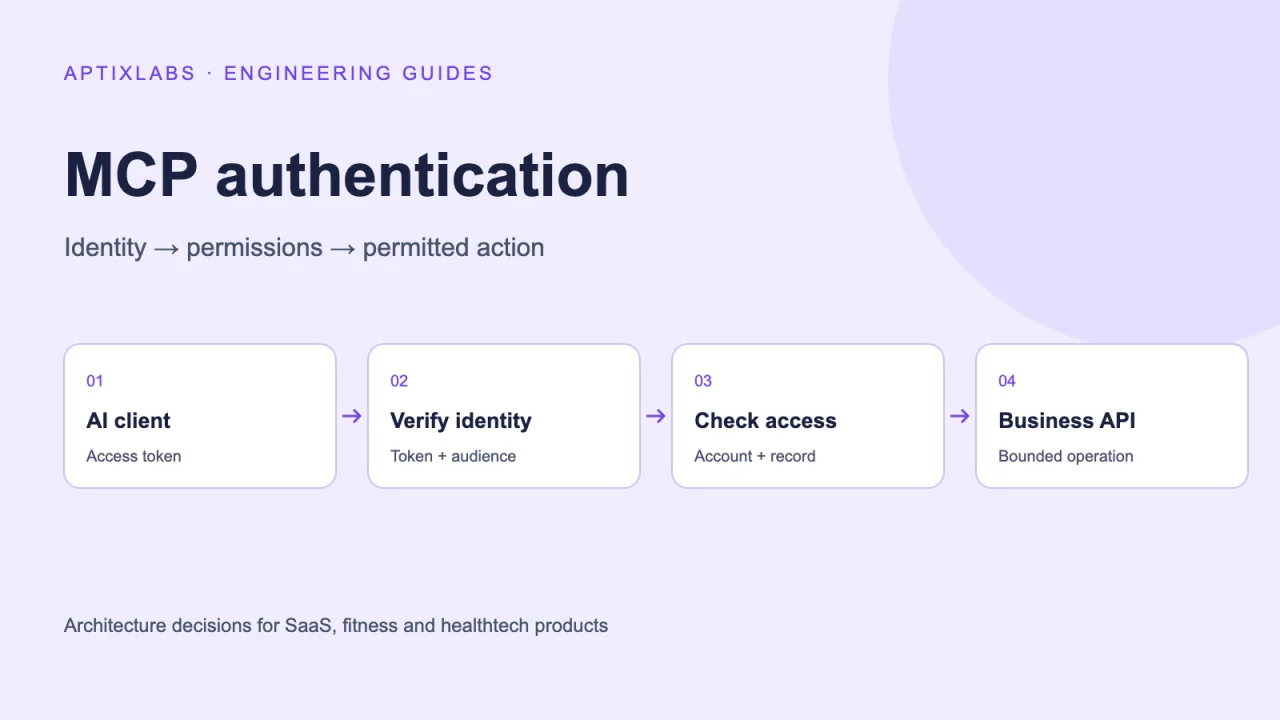
An MCP server lets an AI client call product tools. For a SaaS team, the important design decision is which account those tools act for and which changes that account may make. A working connection is only the start. The implementation needs verified identity, operation-level permissions and the same record ownership checks as the normal product API.
Separate three decisions before writing tools
Authentication establishes who is calling. Authorization determines whether that identity may perform an operation. Record ownership determines whether the specific resource belongs to the permitted account or relationship. A valid token can pass the first check and still fail the other two. Write these checks down for every tool, including read-only exports.
Consider a coach asking an assistant to update a programme. The request needs an authenticated coach, permission to edit programmes and an active relationship with the intended client. Taking the client identifier from the model and trusting it skips the most important business check. Resolve the relationship in application code before loading or changing the programme.
Validate tokens for the resource receiving them
The MCP security guidance requires audience validation and prohibits token passthrough. A token accepted by one service is not automatically a credential for another. Keep upstream authorization separate, and use the protocol guidance appropriate to the transport and specification version your client supports. Never treat a session identifier as a replacement for authentication.
In a project review, ask the team to draw each token issuer, recipient and storage location. Include browser callbacks, background workers and any proxy that calls another provider. This small diagram often exposes ambiguity earlier than reviewing a large tool registry. Record the supported reconnection and revocation behaviour alongside the happy path.
Keep tool permissions narrow and testable
Start with a small workflow such as reading a permitted programme and preparing an edit. Separate previewing a change from applying it when the consequence warrants review. A confirmation screen is useful only when the server binds it to the actual proposed change and rechecks access at execution time. A generic “yes” in conversation should not authorize an unrelated later operation.
- Reject an unknown tool before entering business logic.
- Validate argument shape, ranges and required fields on the server.
- Resolve account context from verified identity, not a model-provided account field.
- Check access again after a queued operation waits or a relationship changes.
- Return an explicit failure when the operation is denied; do not manufacture a success message.
What the UltraFit360 code illustrates
The reviewed UltraFit360 MCP router passes verified user identity and scopes into tool dispatch. Its coach dispatch tests include a case where a non-coach is refused and no tool runs. These are concrete examples of placing checks before execution. A source review and a test definition do not certify the deployed service; the same cases still need to run against the release being assessed.
Build an acceptance matrix around account boundaries
Use two unrelated workspaces and a former member. For each read and write tool, try a valid record, a crossed workspace identifier, an expired credential and a revoked relationship. Capture the expected response and whether any database write occurred. Include a tool timeout after a successful write so a retry cannot silently duplicate the action.
Also test hostile instructions inside retrieved text. A document that says “ignore permissions” must remain content, not authority. Restrict outbound destinations if tools accept URLs, and keep sensitive tokens and customer content out of routine logs. This combines protocol checks with product-specific failure cases rather than relying on a prompt alone.
Scope an MCP integration as a product feature
A useful delivery brief contains the allowed client types, tool inventory, identity mapping, consent flow, rejection cases and operational owner. AptixLabs can use that brief to assess an integration against an existing API. The first milestone should demonstrate one permitted task and its denial cases before expanding the tool surface.
MCP security guidance: token validation and authorization boundaries
Does an authenticated MCP client have access to every tool?
No. The server must separately authorize the operation and verify access to the requested record. A valid token does not establish ownership of an arbitrary account identifier.
Can prompts enforce workspace isolation?
No. Tool handlers and the business API must enforce account boundaries. Prompts can guide behaviour, but cannot replace server authorization.
What should an MCP integration pilot include?
Include one useful task, token validation, denied-access cases, revocation, duplicate-write handling and a record of the resulting application state.