
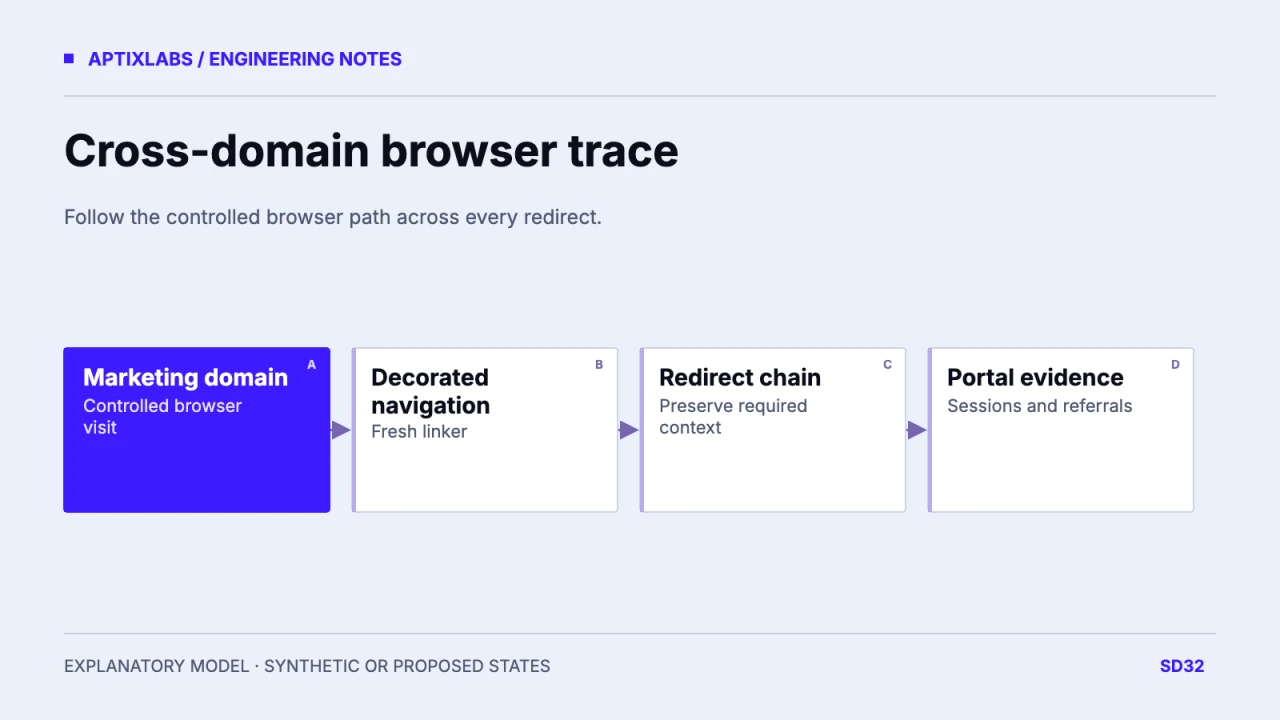
Verify cross-domain browser measurement by following the same controlled journey across the named domains, including redirects and linker handling. Do not extend that result to a native-app installation or an untested identity system.
Define the browser domains and intended continuity
List the marketing domain, web portal, checkout and any intermediary redirect. Identify which domains actually belong in one measurement journey and which are external referrals. Record the Google tag or data-stream configuration used on each. A shared brand or company does not establish technical continuity. Google’s current guide recommends the Analytics administration path for GA4 cross-domain configuration and describes linker-based cookie information transfer. The test should verify the actual browser route, rather than assuming two separately implemented properties can be joined by adding a UTM parameter.
Check linker prerequisites and consent behavior
The documented linker appends a _gl parameter at navigation time and the destination reads it to establish the supported measurement context. Its validity is short-lived, so use a fresh click rather than copying an old decorated link into a later test. Confirm the destination’s tag settings and that consent choices are applied consistently. Do not copy raw measurement identifiers into business records or public diagnostics. A blocked cookie, browser restriction or declined consent can change what is observed, so retain those conditions instead of interpreting every split session as a configuration defect.
| Hop | Inspect | Boundary |
|---|---|---|
| Marketing landing | Tag and consent state | Browser scope |
| Click to portal | Fresh linker decoration | Not authentication |
| Redirect | Parameter preservation | No unrelated rewrite |
| Destination task | Session and referral evidence | Native install not covered |
Trace a synthetic marketing-to-portal path
Use fictional domains marketing.example.test and portal.example.test to describe the experiment. A controlled visitor opens a campaign landing page, clicks into the portal, passes through any redirect and completes a safe fictional task. Capture whether the linker is present at the relevant hop and whether redirects preserve it until the destination can process it. Then compare permitted session and referral evidence in the measurement system. This is a proposed test plan; no live cross-domain identity was configured or verified here, and it is not a claim that AptixLabs and UltraFit360 share an analytics identity.
Separate browser continuity from native-app attribution
A link opening a mobile app, an app-store installation and an SDK event have different identity and attribution mechanisms from a browser linker. Document those flows independently. A successful web-portal test does not prove a native installation shares the same session or user identity. Also distinguish measurement identity from authentication: a linker does not sign a person into the destination or grant application access. Keep authentication, account matching and analytics consent under their respective contracts. This prevents a reporting implementation from becoming an unsupported product identity claim.
Compare referrals and sessions under matched conditions
Use the same browser, consent state, domain configuration and complete reporting window for the controlled comparison. Inspect unexpected self-referrals and missing linker hops, then isolate the failing redirect or tag. Avoid changing several domain and referral settings at once without retaining the original configuration. Redact diagnostic identifiers and keep test traffic out of business conclusions. If a path remains split because the environment cannot support continuity, record that limitation in reporting. The deliverable is a traced journey with exact boundaries, not a promise of perfect user counts across all browsers and devices.
LinkedIn blog distribution measurement
Bring the browser-domain journey and redirect map to scope a controlled continuity test.
B2B SaaS development: scope and acceptance
Does cross-domain measurement sign users in?
No. Measurement continuity and application authentication are separate mechanisms.
Does a web-to-portal test verify native installs?
No. Native SDK identity and installation attribution need a separate implementation and test.