
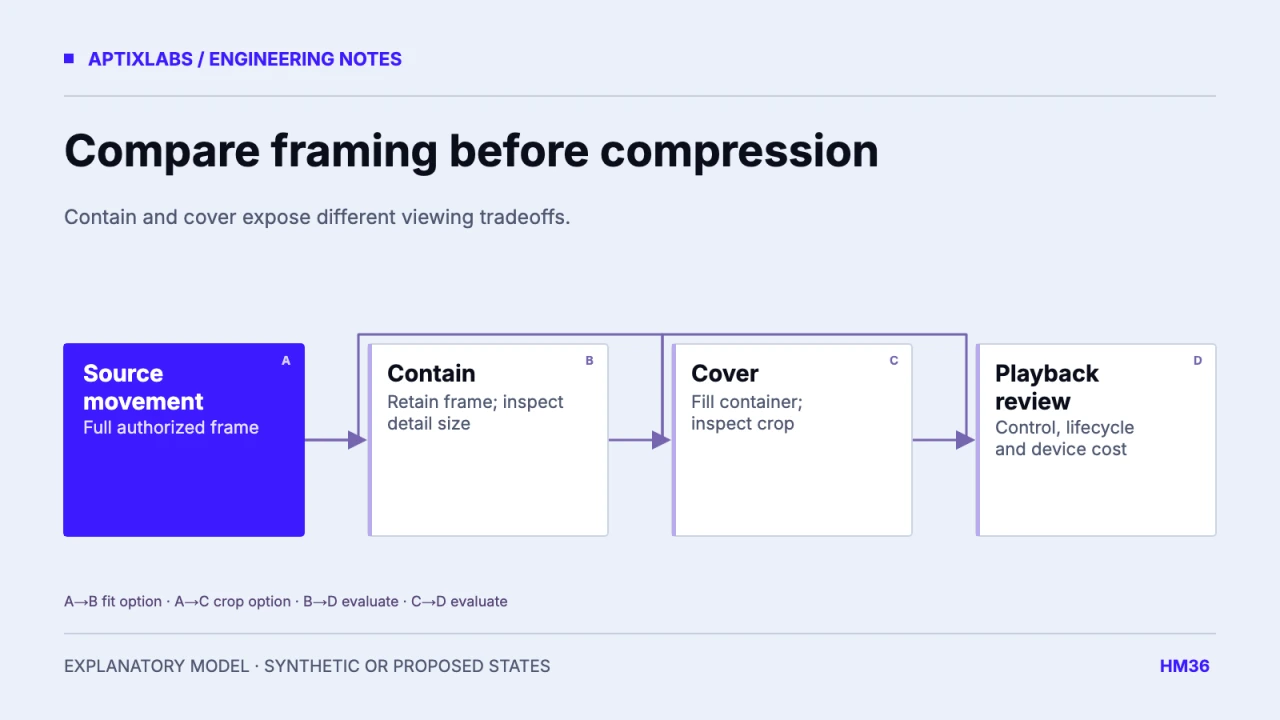
Choose exercise media by whether the movement remains understandable and controllable on the target phone. Compare GIF and video on full-movement framing, playback lifecycle, transfer and decoding. A smaller file is not a better demonstration if it crops the relevant part of the movement or keeps playing after the user leaves.
Prerequisites are authorized source media, the intended container dimensions, supported device classes and the playback library version. Use the same movement and comparable visual quality when comparing formats. Changing the crop, duration and resolution at the same time makes a file-size comparison difficult to interpret.
Check hands, feet and equipment before transfer size
The reviewed UltraFit360 ExerciseGif component defaults to contain, uses a neutral letterbox background and has a missing-or-failed-media placeholder. That source pattern prioritizes retaining the image frame. It does not establish that every catalog asset has sufficient framing or that every supported phone decodes it well.
| Source and container | Contain | Cover |
|---|---|---|
| 360 × 640 source in 320 × 180 container | About 101 × 180 visible image | About 320 × 569 scaled image |
| Whole movement frame | Retained with side space | Vertical content cropped |
| Review question | Are details large enough? | Are hands, feet or equipment lost? |
The dimensions are synthetic arithmetic, not a screenshot or an encoded-media benchmark. Contain preserves the full frame but may make detail too small. Cover fills the container but can hide meaningful motion. A different container or a dedicated full-screen view may solve the task better than choosing either crop blindly.
Compare playback behavior as well as format
A looping GIF is simple to place as an image but may offer limited playback control through the chosen image component. Video can support explicit pause, replay and seeking through its player. The actual behavior depends on the library, format and native implementation; test the supported build rather than assuming all animation formats share one lifecycle.
Expo Video documents fit modes and player behavior. Check the installed SDK’s API and known issues before relying on a latest-version example. The reviewed workspace uses Expo 54 dependencies, so current documentation and application source need a version-aware comparison.
Expo: video fit modes and playback APIs
Measure one equivalent viewing journey
Measure cold load, warm load, time until a useful frame, network bytes, memory and playback responsiveness for the same clip. Include a lower-end supported phone and the release-like build. Record codec, dimensions, frame rate, duration and quality settings alongside results. Report observations, not an invented universal GIF-versus-video savings percentage.
In a scrolling catalog, pause or release playback when the item is no longer viewable according to the chosen policy. In a workout detail screen, decide whether navigation away stops the player and whether returning restarts or resumes it. Multiple offscreen players can change resource use even when each clip is small.
Design failed-load and reduced-connectivity states
A placeholder should preserve the exercise title and a usable next action. Offer text instructions or an explicit retry where supported instead of an endless spinner. Do not interpret a failed demonstration download as evidence that the exercise itself is unavailable in the assigned program.
Acceptance should include missing media, failed load, slow connection, repeated navigation, orientation change and accessibility controls. Review the entire movement at mobile size, including the extremes of motion. Verify that looping does not obscure the start and end positions.
No exact fictional local media screen or controlled encode comparison was verified here. The researched screenshot therefore becomes a framing-and-lifecycle diagram. The useful deliverable is a comparison worksheet with measured device results to fill in, plus a visual framing review before compression decisions.
Use a poster or first-frame policy intentionally. A blank player before download can make a valid demonstration look missing, while a poster showing only one position may be mistaken for the whole instruction. Keep the loading state and playback affordance clear. Test a user who taps replay before preparation finishes, then navigates away. The old clip should not begin later offscreen, and the returned screen should show the chosen restart or resume behavior rather than an accidental decoder state.
Accessible workout controls and feedback
Bring the supported devices, installed SDK versions and a reproducible lifecycle or UI failure to scope a mobile engineering assessment.
Explore react native development
Should exercise demonstrations use GIF or video in a React Native app?
Compare full-movement visibility, playback controls, decoding and transfer on supported devices. Choose the format after verifying the actual viewing task.
Does a smaller exercise asset automatically improve the experience?
No. Visibility, quality, playback control and device behavior must be assessed for the same viewing task.