
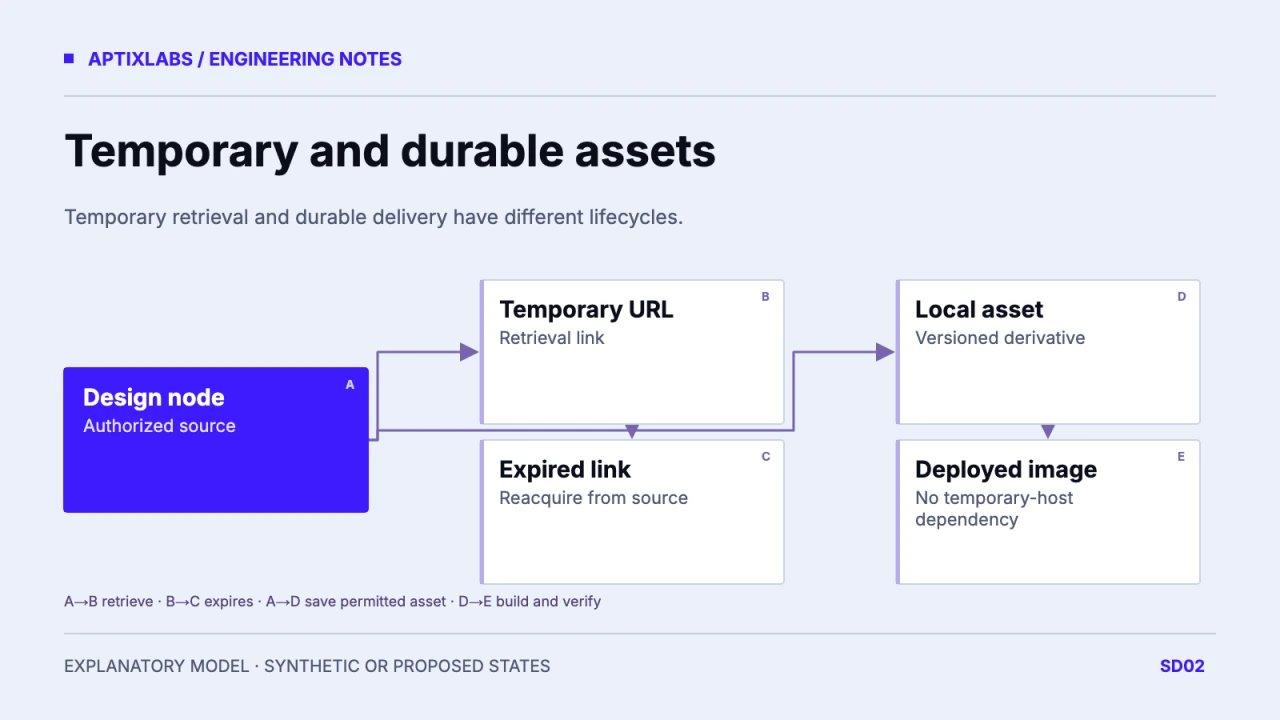
Recover expired Figma MCP images by reacquiring the same authorized design asset, saving a durable copy in the codebase and replacing temporary runtime URLs. New temporary links are another retrieval step, not a deployment strategy.
Find the temporary URL that reached the page
Inspect the image request in the browser and locate the matching reference in JSX, CSS or generated data. Compare the requested URL with the asset returned during the design task. A page can retain its text and layout while only one image stops working. Record the response status and whether the page is attempting the original remote link or a local asset route. Avoid publishing complete signed URLs in diagnostics. Also check ordinary causes such as a wrong relative path, missing deployment artifact or Content Security Policy before attributing every image failure to expiry.
Return to the same source node
Figma documents temporary hosting and says returned asset URLs can expire. Ask for fresh context from the original design link; generated images saved in a Figma file can be downloaded using the returned file key and node ID. Confirm the intended variant, crop and authorization before saving anything. A visually similar stock image is not a substitute for tracing the correct source. Fresh links should be used for controlled acquisition, while the durable path belongs to the asset pipeline. The documentation does not supply a universal expiry duration to hardcode.
| Field | Synthetic value |
|---|---|
| Source node | demo-card-hero |
| Local destination | /assets/demo-card-hero.webp |
| Permission status | Review before deployment |
| Old-host-blocked check | Proposed; not executed |
Give the asset a small provenance manifest
For a synthetic client card, record design node demo-card-hero, retrieval date, local destination /assets/demo-card-hero.webp, intrinsic dimensions and usage permission status. Add a content hash when your pipeline supports it. Keep source identity stable even if an optimized derivative changes filename. The local file should be reviewed for metadata and rights before it enters a public build. Do not place credentials or the expiring signed URL in a committed manifest; retain only the nonsecret source reference that an authorized designer can use to reacquire it.
Replace references and preserve image geometry
Update both markup and background-image declarations, including responsive candidates. Confirm that every declared derivative exists in the deployed artifact. Reserve width and height or a deliberate aspect ratio so a repaired image does not introduce a new layout shift. The repository’s ProductFigure component illustrates responsive candidates and explicit dimensions; it is not an asset acquisition service. Check crops at narrow and wide widths. A successful request for the original file does not prove that a -640 derivative was generated or that the CDN serves the intended content type.
Test without dependence on the temporary host
Use a controlled browser rule to block the former asset host, then load the page from a clean cache. The local image should remain readable and its request should resolve from the intended deployment origin. This is a proposed acceptance procedure, not an executed expiry experiment. Check both normal and error states and preserve the network record. If policy requires an external asset service, document its durability, authorization and lifecycle instead of assuming any remote URL is stable. Keep the reacquisition manifest with the design handoff so the next asset update has an owner.
Figma to code: a handoff checklist that survives real product states
Figma MCP acceptance tests: check the UI beyond the matching screenshot
Bring the design node and one broken asset request to scope a durable asset handoff.
B2B SaaS development: scope and acceptance
How long do Figma MCP image links last?
The current guide says they expire but does not establish one universal lifetime. Do not use an assumed lifetime as a production dependency.
Is a fresh URL enough to fix the deployment?
It may restore a preview temporarily. Durable delivery requires a permitted local or managed asset and updated runtime references.