
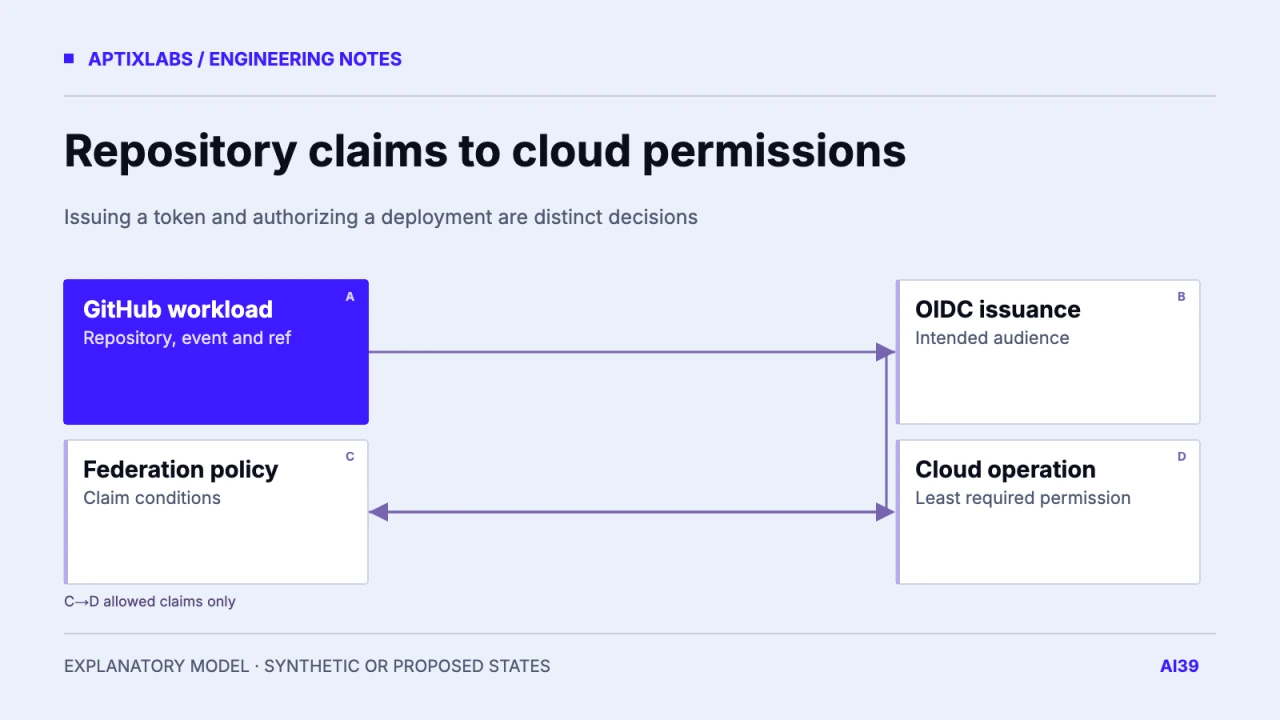
Use GitHub OIDC to request short-lived Google Cloud access only after defining which repository, workflow context and ref may cross the trust boundary. Token issuance and cloud permissions are separate steps. Build a permitted-and-denied fixture in an isolated project before replacing deployment credentials. A workflow that can request an OIDC token has not automatically gained permission to deploy anything.
Trust the intended workload identity
Inventory repository identity, owner identity, workflow, event type, branch or tag and deployment environment. Prefer stable identifiers where supported and inspect the actual claims for your repository's OIDC subject format. Current GitHub documentation notes changed immutable default subject behavior for newer repositories and certain rename/transfer events, so an older name-only policy example may not describe your token.
GitHub's Google Cloud OIDC guide requires conditions that prevent untrusted repositories from obtaining cloud access and explains that id-token: write permits token requests, not modification of cloud resources. Configure the cloud provider's claim mapping and conditions independently of the permissions granted to the resulting workload or service account.
GitHub: Google Cloud OIDC conditions, claims and workflow permissions
Draw issuance, exchange and deployment separately
In a synthetic workflow, an approved test branch requests a GitHub-issued token for the intended audience. Google Cloud evaluates the configured federation conditions. The accepted principal receives only the permissions required to publish the approved artifact to an isolated service. A request from another repository or unapproved ref must fail at the intended trust boundary, even if the workflow file contains the same action steps.
| Request | Trust outcome to verify | Operation outcome |
|---|---|---|
| Approved repository/ref | Accepted by conditions | Only intended test deployment |
| Unapproved ref | Denied | No deployment access |
| Unrelated repository | Denied | No impersonation |
| Accepted identity, extra operation | Identity may be valid | Cloud role denies excess action |
Use the official google-github-actions/auth action following its current supported configuration. Pin a reviewed real commit or approved version according to the repository's dependency policy; never copy a placeholder hash as if it identifies a release. Protect generated credential files from artifacts, caches and logs. The action's README documents its own runtime and authentication prerequisites, which should be checked with the selected runner image.
Google Cloud authentication action: configuration and lifecycle
# Illustrative permissions fragment, not a complete deploy workflow.
permissions:
  contents: read
  id-token: write
# Federation provider, claim conditions and cloud roles are configured separately.
The fragment deliberately omits project IDs, identity-provider paths and deployment commands because those belong to the reviewed test environment. An environment name alone is not a cloud trust condition unless the mapping and policy actually check the corresponding claim. Review pull-request and reusable-workflow paths explicitly; their claim shape and trust implications can differ from a direct push deployment.
Give the deployment identity only its job
Separate permission to publish the artifact from permission to change IAM, secrets or unrelated services. If service-account impersonation is used, review both who may impersonate it and what that service account may do. Avoid broad project roles merely to make an initial proof pass. The acceptance suite should verify a harmless permitted action and a denied out-of-scope action so the permission boundary is observable.
Keep build verification and credential trust as distinct gates. An approved identity should deploy the same artifact that passed checks, with its commit and artifact digest recorded. OIDC does not prove tests ran or that the artifact is correct. Conversely, passing tests should not let a fork or unapproved ref assume the release identity.
Retain a redacted allow/deny trace
In an isolated project, exercise an approved ref, unapproved ref, unrelated repository and wrong audience. Capture claim categories, policy decision and cloud operation result without storing raw tokens. No federation or deployment experiment was executed for this article; the diagram is a proposed trust contract. Existing website build scripts establish an artifact boundary only, not a deployed OIDC pipeline. Use the resulting test evidence to plan credential replacement and rollback rather than claiming a configuration snippet guarantees secure deployment.
CI/CD for a small team: ship a known build and rehearse recovery
Observability for small teams: start with the failed customer task
Bring one API or data workflow and a sanitized failure example for a bounded implementation assessment.
What should GitHub OIDC to Google Cloud restrict?
Restrict the intended repository and workflow/ref context in federation conditions, then separately grant only the cloud permissions required for the deployment.
Does id-token: write grant deployment permissions?
No. It allows requesting an OIDC token; federation trust and cloud roles decide resource access.
Can a copied example subject always identify the repository?
No. Inspect the repository’s current subject format and claims, including stable IDs and relevant creation or transfer behavior.