
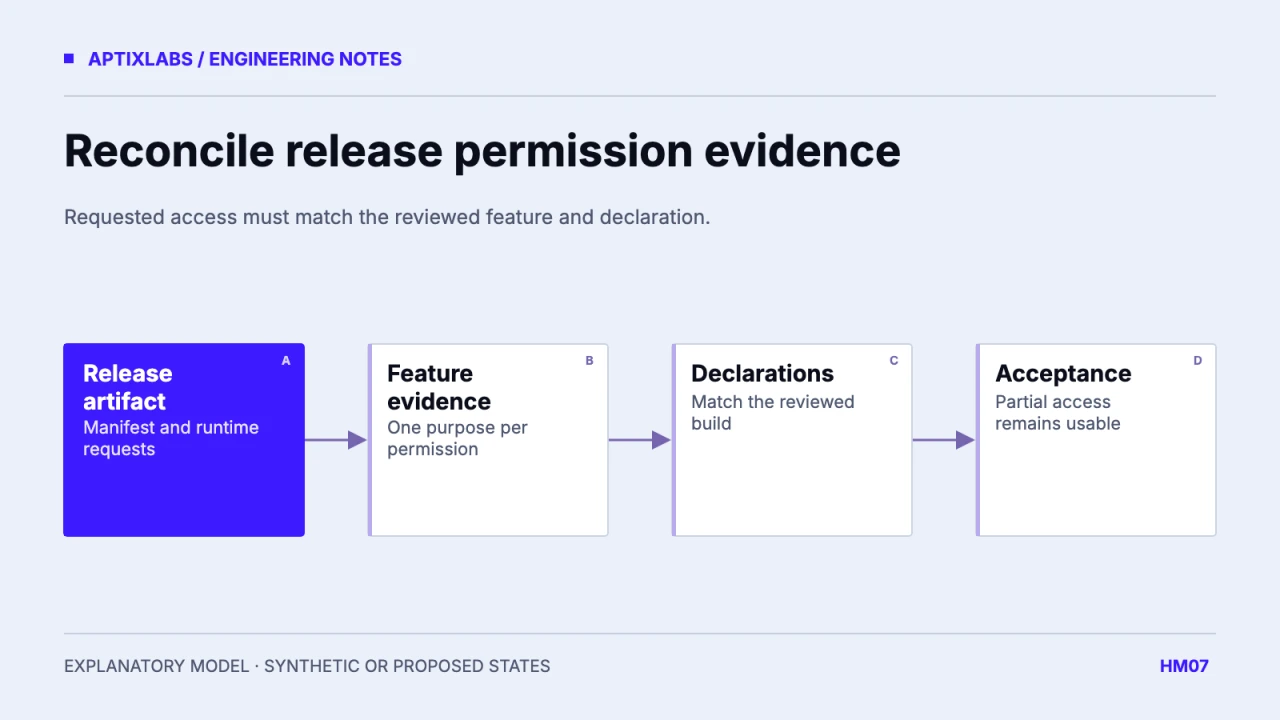
A Health Connect release checklist should reconcile what the submitted build requests with what the product does and what the Play declarations say. Begin from the compiled release and its actual permission flow, then check each requested record type against a specific user-facing feature. A broad integration plan is insufficient evidence for a particular release.
Collect the build number, package identity, native dependency versions, merged manifest, permission adapter and current store disclosures. Include optional libraries and configuration plugins because requested access may come from generated native files. Keep the artifact under review identifiable so a later code change cannot silently invalidate the checklist.
Inventory one row per record and direction
Android’s publishing guidance asks teams to complete Data safety and Health Apps declarations and request only permissions supporting the health features offered. It also calls for a consistent privacy policy in the relevant store and Health Connect locations. These are release inputs to verify; a completed worksheet does not guarantee policy approval.
Android: publish a health app and declare data use
| Requested access | Visible use | Review decision |
|---|---|---|
| Read steps | Activity summary | Retain if implemented and disclosed |
| Read sleep | No release feature uses it | Remove or explain verified scope |
| Write nutrition | Proposed future integration | Do not request for a roadmap alone |
| Background read | Freshness workflow | Verify necessity and exact support |
These rows are synthetic. The unused sleep permission is an example of a mismatch, not a claim about a submitted UltraFit360 build. Assign an owner and evidence link to each real row. Include read versus write separately; the same data category can have different responsibilities in each direction.
Compare generated native access with runtime requests
A manifest declaration permits a capability to be requested; runtime code determines what the user is asked to share. Review both. A removed screen can leave a runtime request behind, and a JavaScript change may not remove a generated declaration until a new native build is created. Inspect the exact release artifact after configuration changes.
The reviewed UltraFit360 service checks SDK status before proceeding with Health Connect access. That source range is useful context for availability handling but is not a manifest or Play Console audit. This article records a release-review method, not a claim that a declaration has been submitted or accepted.
Test limited access as a supported journey
Use synthetic records and grant only part of the requested access. Verify that the activity view still works when an optional metric is unavailable, that reconnect does not imply missing grants were restored, and that stale cached values are not presented as newly imported. Capture the feature’s visible behavior rather than only the success value of a permission function.
Repeat after revocation and after an app upgrade. Permissions and data availability can change outside onboarding. Ensure that the help route leads to current platform settings and that dismissing the flow leaves unrelated tasks usable. Review any coach-facing view separately: import permission does not decide which staff member may see the imported record.
Retain evidence for the submitted version
The review pack should contain artifact identity, a permission-to-feature map, disclosure owner, screenshots from the actual synthetic test account and results for allowed, partial and unavailable access. Keep credentials out of the pack’s public version. State the device and provider version for each observed behavior.
If a feature is deferred, remove its unused access or explicitly re-scope the release before submission. A future medical-record integration deserves its own assessment rather than inheriting an activity permission explanation. Treat review feedback as a reproducible build issue, and update the inventory when the requested types change.
Record optionality in the feature map. A permission used only by an optional dashboard should not become a hidden prerequisite for manual workout logging. The test account should demonstrate both the connected and disconnected journeys in the submitted binary. When an owner signs off a declaration row, retain the build-specific evidence it refers to. Reusing last release’s approval note without checking a changed native dependency can leave the current release’s actual request surface unexplained.
Bring one client-to-coach workflow, current data contract and acceptance constraint to discuss a bounded fitness product build or integration pilot.
Explore health fitness app development
What should a Health Connect release checklist compare?
Compare the exact build’s requested permissions, user-facing features, privacy disclosures and Play declarations, then test partial access on that build.
Does matching declarations guarantee Play approval?
No. It makes the release reviewable; the platform evaluates the actual app and current requirements.