
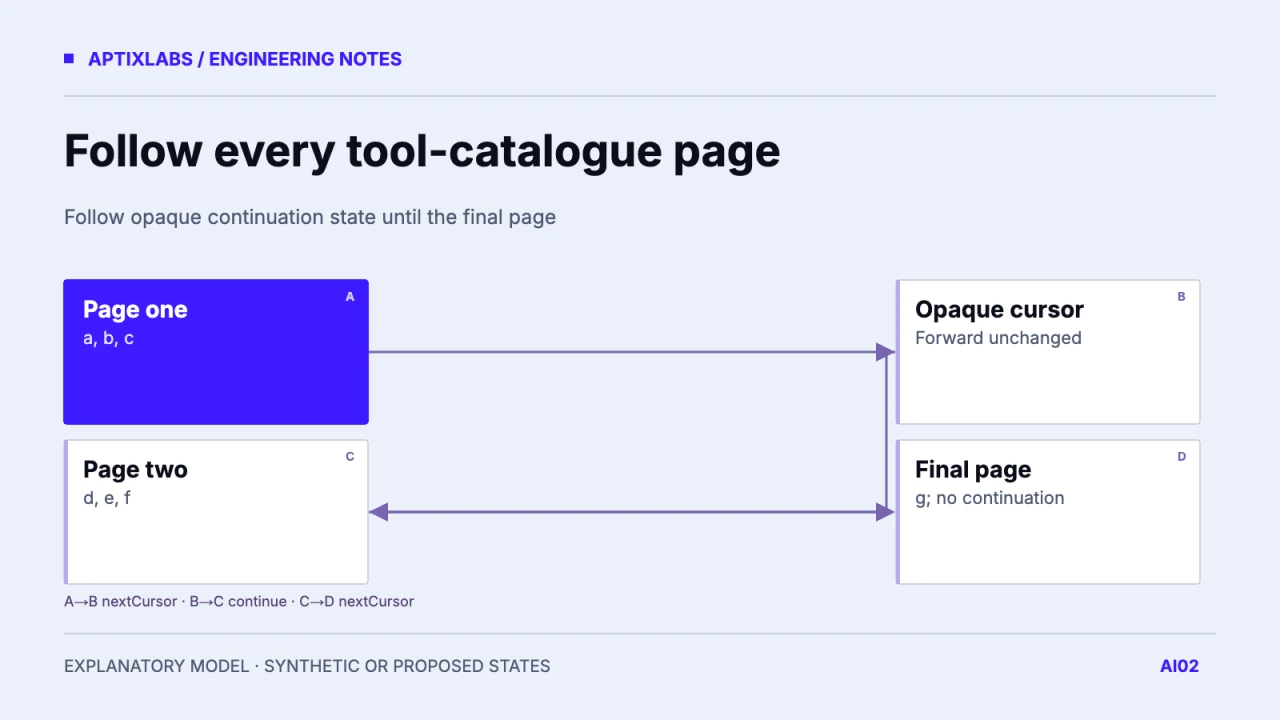
An MCP connection can succeed while tool discovery remains incomplete. Collect every tools/list page before comparing the advertised catalogue with the tools shown by the host. Keep cursors opaque, preserve the relevant authorization context and stop only at the documented end condition. A missing tool on page three is a discovery failure even when page one and an unrelated tool call work.
Separate the wire catalogue from the chooser
There are at least three inventories to compare: the server's complete response sequence, the host's cached catalogue and the subset enabled for the current conversation. Count names at each boundary. A permission filter or user setting can legitimately reduce the final list, while a collector that ignores nextCursor silently truncates it. Save a redacted list of tool names and schema hashes rather than assuming the host's visible count represents the server.
The current MCP tools specification defines paginated listing. Read the contract for the revision negotiated or declared by your actual client. The July 2026 revision and older supported revisions differ in other lifecycle details; a successful pagination fixture does not establish compatibility across those eras. Keep the server release, SDK version, host build and supported protocol revision with the inventory.
MCP tools specification: listing, pagination and tool results
A seven-tool catalogue over three pages
Our isolated collector fixture uses fictional tool names a through g. The first two pages contain three names each and return opaque continuation tokens; the third contains g and no nextCursor. The executed result collected all seven names. It also followed an empty intermediate page that still contained a continuation token and rejected a cursor cycle. These are local collector results, not observations of a deployed MCP host.
cursor = None
seen = set()
tools = []
while True:
    if cursor in seen:
        raise ValueError('cursor cycle')
    seen.add(cursor)
    page = fetch_page(cursor)  # authorized, bounded request
    tools.extend(page['tools'])
    if 'nextCursor' not in page:
        break
    cursor = page['nextCursor']  # do not decode or increment
The pseudocode assumes the server uses absence of nextCursor as its final-page contract. Add response-schema validation and a maximum page or elapsed-time budget before using a collector in a product. If your SDK normalizes a terminal cursor, follow its documented representation. An unexpected empty-string cursor is a malformed or provider-defined case to resolve explicitly, not a reason to invent a numeric page offset.
| Fixture | Result |
|---|---|
| Three normal pages | Seven names collected |
| Empty intermediate page | Continuation followed |
| Repeated cursor | Cycle rejected |
Stable ordering needs an owner
A cursor should identify continuation within the server's ordering contract. If tools can change while pages are being fetched, decide whether the server gives a consistent snapshot, a generation token or a documented best-effort view. The collector can detect duplicate names and repeated cursors, but it cannot reconstruct a tool omitted by a changing catalogue. Restarting discovery on a generation change may be appropriate when the provider exposes that signal.
Authorization can also change between pages. Do not fetch page one as one account and the next page under a different token merely because both requests reach the same URL. Store the principal, permitted scope set and endpoint identity with the discovery run. If those inputs change, invalidate the run instead of merging two catalogues whose access rules differ. Tool names in logs can still reveal product capabilities, so retain only what the operational review needs.
Compare once before refreshing caches
After exhausting the cursor sequence, compare names and schemas with the host. If the fresh response contains g but the chooser does not, inspect host caching, enablement and capability support. If g never arrived, investigate the server list or collector first. Refreshing a host cache cannot recover a page the server never sent.
Turn this diagnosis into one small release check: the last expected synthetic tool must appear exactly once, and a permitted read call must work through the supported host. Keep execution separate from discovery: finding a schema does not establish that business authorization permits the call. The saved local fixture and result provide a reproducible starting point; real SDK and host coverage remains a release-specific task.
Evaluate the tool action, not just the answer.
Bring one tool workflow, supported hosts and a sanitized failure trace for a scoped AI integration review.
AptixLabs ai agent development
Why can a connected MCP client miss tools?
The client may have collected only the first tools/list page, cached an older catalogue or filtered tools after discovery. Exhaust cursors before comparing host state.
Does an empty page mean listing is finished?
Only if the response meets the documented terminal condition. An empty page can still carry a continuation cursor.
Should a client decode the cursor?
No. Treat it as opaque continuation state and send it back unchanged under the same authorization context.