
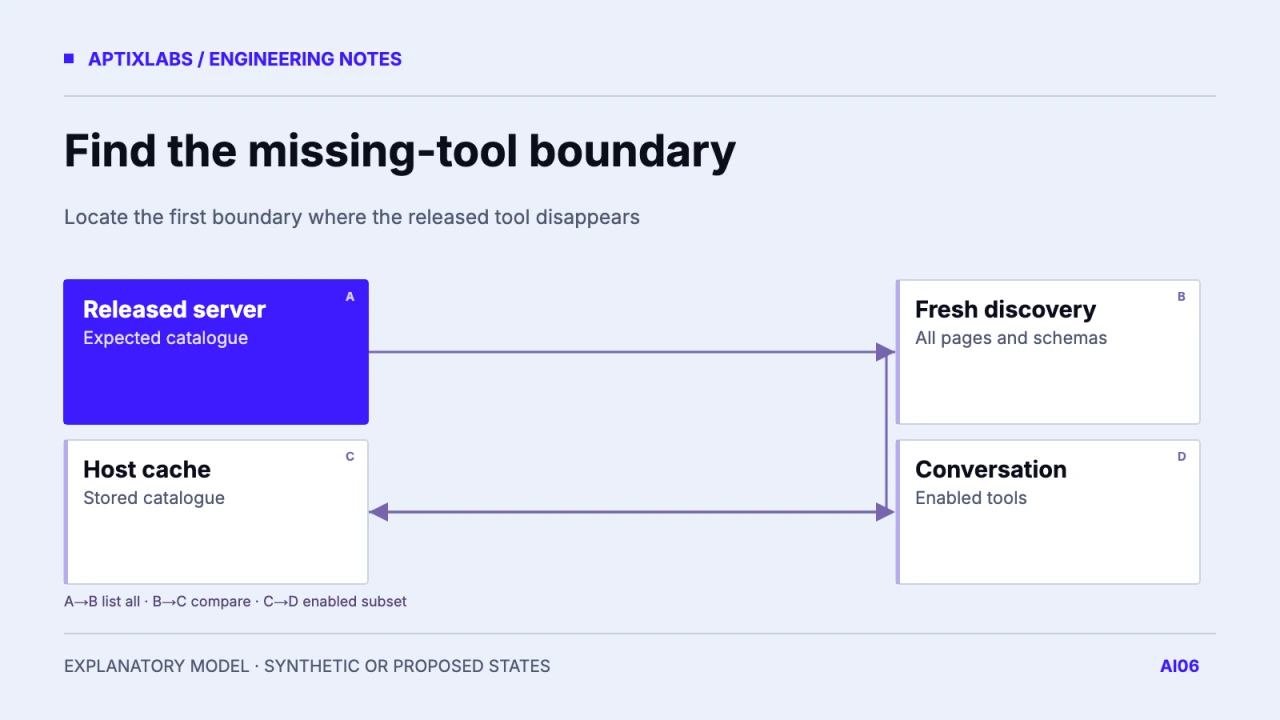
When tools disappear after a release, compare a fresh, fully collected server catalogue with the host's cached and enabled tool state. First confirm that the host reached the intended endpoint under the intended account. Refresh only the cache implicated by the evidence, then verify one permitted call. Reconnecting blindly can hide an endpoint or authorization mismatch without explaining why it happened.
Identify the server the host actually reached
Record the resolved URL, server identity, deployment revision and host build. Include local versus remote configuration, workspace overrides and environment selection. A developer can update a production service while the editor still launches a local process from another checkout. Another common diagnostic fork is the correct hostname with an older route behind a proxy. Use a harmless build identifier or catalogue digest; never expose configuration secrets in a support screenshot.
The VS Code MCP configuration reference describes server configuration and management behavior for that host. Treat its commands and cache behavior as host-specific. Another client can keep discovery state at a different scope or refresh at a different time. Check the version of the host being tested and follow its supported refresh path rather than deleting unrelated application data.
VS Code MCP configuration reference
Follow the catalogue through four boundaries
For a synthetic release, the old catalogue contains search_records and get_record. The new release adds summarize_record. Capture the complete fresh tools/list sequence using the same principal and revision as the host. Compare the resulting names and schema hashes with the cached host list and the conversation's enabled subset. If a page cursor remains, discovery is not complete enough to support a cache diagnosis.
| Boundary | Expected v2 | Observed fixture |
|---|---|---|
| Fresh server list | Three tools | Three tools |
| Host cache | Three tools | Two old tools |
| Conversation | Enabled v2 subset | Two old tools |
| After targeted refresh | New schema and permitted call | Must be verified in real host |
The fixture above is a proposed trace, not an observed editor session. Its value is the comparison order. If the fresh catalogue has the new tool and the cached one does not, refresh that server's discovery state. If the host cached it but the conversation excludes it, inspect tool enablement or capability filtering. If neither fresh nor cached listing contains it, inspect deployment registration, permissions and the complete server response before changing the host.
Account and capabilities change the expected list
A different account or granted scope can legitimately receive a different set of tools. Compare like with like: endpoint, principal, workspace, scope set and supported revision. Where access is enforced only at execution, a listed tool may still refuse a call. Where discovery is filtered, absence may be intentional. Document which product contract you use so support can distinguish an expected restriction from a release regression.
For capabilities, inspect the schema and optional mechanisms the tool requires. A host may reject an invalid definition or lack a required feature. Compare warnings and schema validation errors before assuming stale state. A renamed tool can also be present under its new identity while a saved prompt keeps requesting the old name. That is an application compatibility problem, even when the host refreshed correctly.
Synthetic diagnostic record
endpoint: approved test MCP URL
server_build: catalogue-v2
principal: fixture-reader
fresh_names: search_records, get_record, summarize_record
cached_names: search_records, get_record
conversation_enabled: search_records, get_record
next action: refresh discovery for this configured server
Finish with an operation, not a changed count
After the targeted refresh, verify that the intended tool schema is available and that one permitted read returns the expected synthetic record. Also check a denial case. The number of tools alone cannot establish correct behavior: the new name might point to the wrong handler or expose a changed argument contract. Keep the before/after catalogue digest and the redacted operation result in the release artifact.
Avoid promising that every host notices changes immediately. The supported revision, notification mechanisms, server capabilities and host cache policy all matter. Publish a bounded operator procedure for your actual supported clients and keep unrelated caches intact. If a refresh repeatedly becomes necessary, add a regression fixture around the discovery boundary and document the remaining host limitation rather than treating each occurrence as a mysterious connection failure.
Evaluate the tool action, not just the answer.
Bring one tool workflow, supported hosts and a sanitized failure trace for a scoped AI integration review.
AptixLabs ai agent development
How do you troubleshoot missing MCP tools after a release?
Compare endpoint and account identity, the complete fresh catalogue, host cache and conversation enablement before using the host-specific refresh path.
Should I clear every editor cache?
Start with the configured MCP server and use its documented refresh path after identifying a stale catalogue.
Can permissions explain a missing tool?
Yes. Discovery filtering or conversation enablement can legitimately differ by principal, scope and host configuration.