
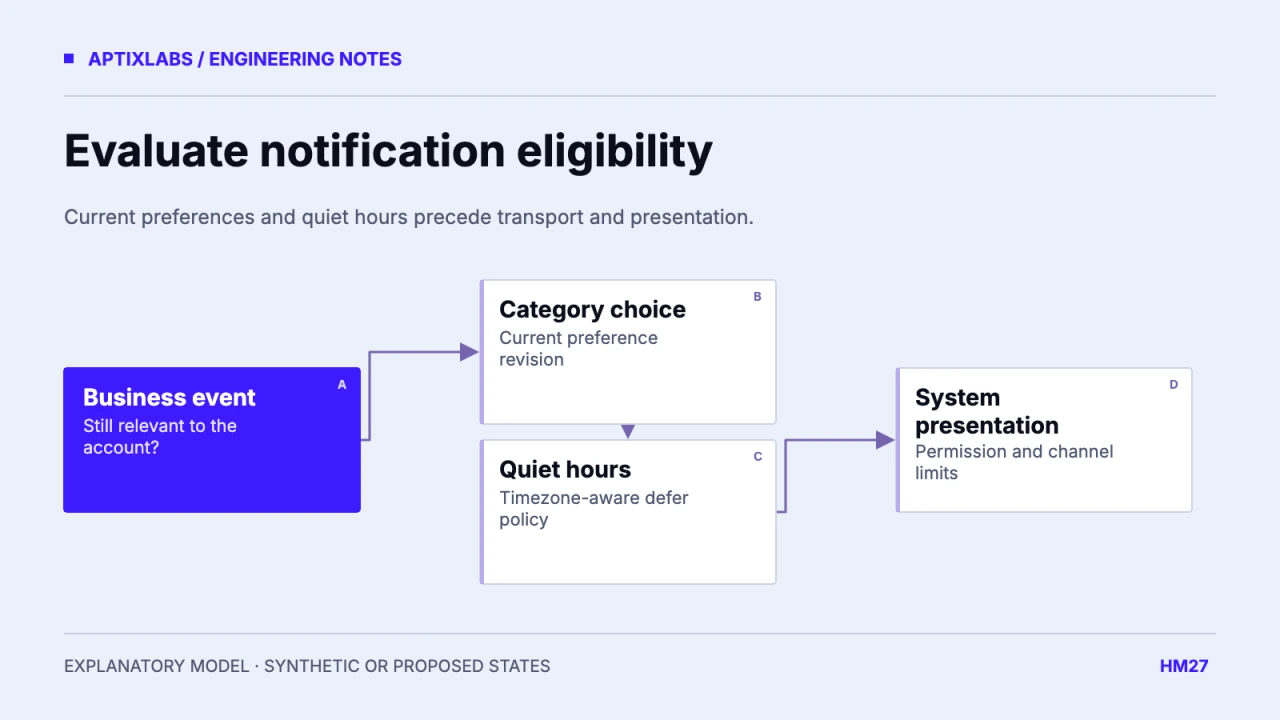
Resolve notification eligibility through one documented contract. First ask whether the business event is still relevant, then apply the person’s category preference and quiet-hour policy. System permission and channel presentation remain additional constraints. Keep the stored category choice distinct from whether a particular message can be sent or heard now.
Prerequisites are stable event identity, notification category, intended account and device, reporting timezone and the current preference revision. A reminder queue should carry enough information to re-evaluate eligibility at send time. A payload produced yesterday should not overrule a preference changed today.
Give suppression a reason without mutating preferences
| Condition | Decision | Stored category choice |
|---|---|---|
| Tips disabled | Suppress tips event | Remains disabled |
| Coach messages enabled; outside quiet hours | Eligible for transport | Remains enabled |
| Nonurgent reminder during quiet hours | Defer or suppress by policy | Remains enabled |
| System notifications unavailable | Do not promise presentation | App choice remains enabled |
A suppression reason is an event outcome. It should not silently toggle the person’s preference off. Record only the minimum operational context needed to explain allowed, deferred or suppressed work. A product support view can then distinguish “you disabled tips” from “this reminder was deferred under quiet hours.”
Android channels provide another user-controlled presentation surface. That system choice needs to be respected alongside the application’s categories; changing an in-app toggle does not establish that a channel will play sound.
Android: notification channels and user-controlled behavior
Evaluate quiet hours in the chosen timezone
For an illustrative policy, quiet hours run from 22:00 to 07:00 in the person’s selected notification timezone. A 23:30 nonurgent reminder is deferred or dropped according to that policy; a 09:00 reminder is outside the window. State whether the timezone follows travel or remains fixed, and distinguish that from the timezone used for historical health reports.
Synthetic local-time rule for a window crossing midnight:
isQuiet = localTime >= 22:00 OR localTime < 07:00
// Resolve localTime using the selected timezone for the event.
The rule is illustrative and does not solve daylight-saving ambiguity by itself. Use timezone-aware scheduling and test skipped and repeated local times. Decide whether a deferred reminder is still useful in the morning; sending every suppressed message at 07:00 can create a burst of obsolete work.
Revalidate queued work before transport
If a client submits a check-in after its reminder is queued, the sender should check current completion before delivery. Apply the same revalidation after a category edit or relationship change. Use a stable business-event identity so a retry does not create a new logical reminder merely because its delivery attempt has a new timestamp.
The reviewed UltraFit360 notification service defines channel purposes and importance values. That is source evidence of device presentation categories, not proof of a complete preference-precedence engine or quiet-hour implementation. This article proposes the combined contract and its acceptance cases.
Keep urgent categories explicit and narrow
If the product has a category with different quiet-hour handling, specify it transparently and verify the supported platform behavior. Do not label routine engagement nudges urgent to bypass a preference. A coaching message’s business importance and a native interruption level are different decisions.
Acceptance should test disabled tips with enabled coach messages, a timezone change, quiet hours crossing midnight, a late check-in and a revoked coach relationship. Inspect queued, suppressed, deferred, accepted and unresolved delivery states separately. No device or queue execution was performed for this guide. The worksheet gives the team a concrete policy to implement and test before expanding reminder volume.
Choose whether preference changes affect already scheduled local notifications. A server queue can revalidate before sending, while a device may already hold a scheduled reminder. The preference contract needs cancellation or reconciliation of those local schedules as well. Test disabling a category after scheduling but before its trigger. Keep local schedule identifiers associated with the logical event so the application can find the relevant work without indiscriminately cancelling unrelated enabled categories on the same device.
Fitness coaching check in automation
Bring one client-to-coach workflow, current data contract and acceptance constraint to discuss a bounded fitness product build or integration pilot.
Explore health fitness app development
How should notification categories, quiet hours and device settings interact?
Evaluate business eligibility, category preference and quiet-hour policy before sending, then respect system permission and channel settings without rewriting the stored choices.
Should all deferred reminders send when quiet hours end?
No. Recheck relevance and apply an explicit expiry or consolidation policy before delivery.